
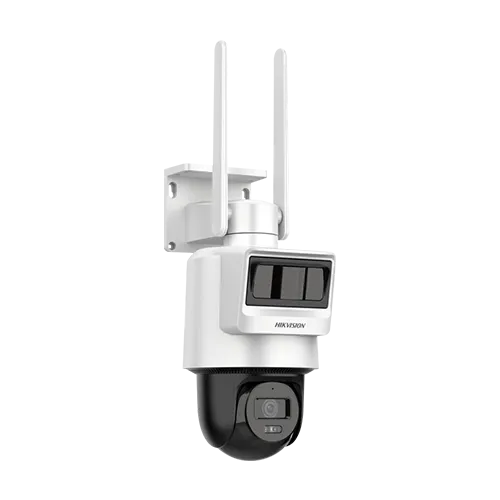
Hikvision MP Pro Solar-powered Security PT Camera Setup – DS-2DE2C200IWG-K/4G/C05S10 2.8MM
KSh31,000.00
To set up the Hikvision DS-2DE2C200IWG-K/4G/C05S10 2.8MM solar-powered security camera, you will need to perform a series of physical installation steps followed by network and software configuration using the Hik-Connect app or SADP tool.
HIKVISION DS-2DE2C200IWG-K/4G/C05S10 (2.8mm) – MP Pro Solar-Powered Security PT Camera
HIKVISION DS-2DE2C200IWG-K/4G/C05S10 (2.8mm) combines advanced surveillance with solar-powered autonomy and 4G wireless connectivity, making it ideal for locations without access to power lines or wired networks. Its MP Pro imaging provides clear, high-resolution video across outdoor spaces such as yards, farms, construction sites, and remote facilities.
This PT security camera supports pan and tilt movement, enabling flexible coverage and the ability to track activity across wide areas. The fixed 2.8mm lens offers a wide field of view to capture broad scenes without frequent adjustments. 4G LTE support allows real-time video streaming and alerts over cellular networks, eliminating the need for physical internet connections.
The integrated solar panel and battery system sustain camera operation even in remote environments. The weather-resistant design protects the unit from dust, rain, and harsh outdoor conditions. With wireless solar power and dynamic PT coverage, this camera provides a versatile and reliable surveillance solution where traditional cameras cannot reach.
Key Features
- High-definition MP Pro imaging delivers clear outdoor video
• Solar-powered operation eliminates need for wired power
• 4G LTE connectivity allows wireless remote monitoring
• Pan/tilt movement enables wide area coverage
• Fixed 2.8mm lens provides wide scene visibility
• Weather-resistant design allows strong outdoor use
Specifications
| Specification | Detail |
| Model | HIKVISION DS-2DE2C200IWG-K/4G/C05S10 (2.8mm) |
| Resolution | MP Pro High-Definition |
| Power | Solar-Powered |
| Connectivity | 4G LTE (Wireless) |
| Lens | Fixed 2.8mm |
| PT | Pan/Tilt |
| Outdoor Rating | Weather-Resistant |
| Best For | Remote outdoor surveillance |
Physical Installation
- Insert SIM and SD Card: Ensure the camera is powered off. Locate the card slots (usually at the bottom of the rotating lens assembly) and insert a high-quality microSD card (up to 512 GB supported) and an active 4G LTE SIM card in the correct orientation, pushing them in until they click into place.
- Initial Power-Up (for activation/configuration): For initial setup and configuration, connect the camera to a temporary external 12 VDC power source using the provided adapter and converter cable, as the built-in battery might not be charged.
- Mounting the Camera and Solar Panel: Securely attach the mounting bracket to a pole or wall using the provided straps or screws. Install the camera and solar panel onto the bracket, ensuring the solar panel is positioned for maximum direct sunlight exposure. The pan and tilt range is 0° to 340° and 0° to 80° respectively, offering flexible coverage.
- Connect Solar Panel to Battery: Use the solar panel power output interface and the battery power input interface to connect the solar panel to the integrated battery system.
Software Configuration
- Activate the Camera:
-
- Wait for Status Light: After powering up, the camera will boot (solid red light). Wait for the light to change to a flashing blue light, indicating it is ready for configuration and has established a network connection via 4G.
- Use SADP Software (PC): For initial network debugging, you may need to connect a laptop to the camera’s network interface with an Ethernet cable. Use the Hikvision SADP software to activate the device by setting a strong password and enabling the Hik-Connect service. A verification code will be created during this process.
- Add to Hik-Connect App (Mobile):
- Install App: Download and install the Hik-Connect app (version 4.13.0 or above) on your mobile device and register an account.
- Scan QR Code: Log in and tap the “+” icon to add a device. Scan the QR code located on the camera body or the quick start guide.
- Input Verification Code: Enter the verification code created during the activation step.
- Finalize Setup: Follow the prompts to finish adding the camera to your account. You should now be able to view live footage and receive notifications remotely over the 4G network.
- Initialize Memory Card: In the Hik-Connect app settings, check the storage status. If the microSD card is “Uninitialized”, tap to format it, which is necessary for recording events.
- Configure Motion Detection: The camera uses dual PIR and Radar sensors for accurate detection. In the camera settings, you can adjust the radar angle (0°, 10°, or 20°) and configure smart events like intrusion detection to get relevant alarms.
Secure remote and off-grid areas with the HIKVISION DS-2DE2C200IWG-K/4G/C05S10 Solar-Powered PT Camera. Get wireless power, 4G connectivity, and dynamic PT coverage for effective outdoor surveillance anywhere.
Be the first to review “Hikvision MP Pro Solar-powered Security PT Camera Setup – DS-2DE2C200IWG-K/4G/C05S10 2.8MM”
Related products
Network Camera
HIKVISION 2MP COLORVU DOME CAMERA – DS-2CD3327G2E-LUF(2.8mm)
Network Camera
Network Camera
Reviews
There are no reviews yet.